Reading Analysis Data from Cloud Storage in R
Original Japanese version: Rで解析データをクラウドストレージから読み込む
This article introduces a way to read raw analysis data from cloud storage.
It assumes the following management approach.
- Raw analysis data: stored in cloud storage such as Google Drive, OneDrive, or Dropbox
- Analysis code: stored in a source-code management service such as GitHub
By separating these, data and code can be managed independently. Also, even if raw data is not placed under Git management, cloud storage makes backup and sharing easier.
However, this method does not depend on cloud storage itself. It assumes that the data exists in a location that R can refer to as a normal file path. For example, by using Google Drive for desktop, OneDrive, or Dropbox, data in the cloud can be handled like local files.
The conceptual diagram is as follows.
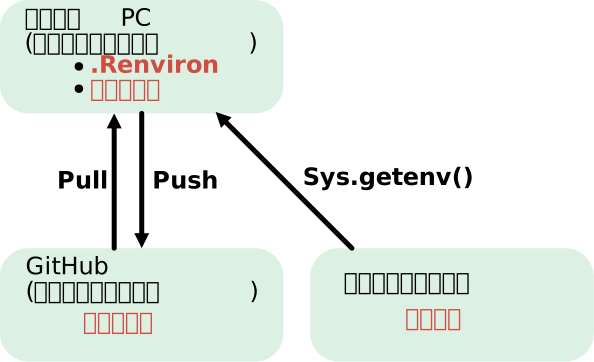
Creating a .Renviron File
If you want to manage analysis code with Git while switching the data storage location for each local environment, it is useful to define the storage location as an environment variable in a .Renviron file.
For example, set it as follows.
.Renviron
PROJECT_DATA_DIR=C:/Users/Username/Dropbox/GitHub/repository-nameReading Data
If an environment variable is set in .Renviron, R can obtain its value with Sys.getenv().
data_dir <- Sys.getenv("PROJECT_DATA_DIR")Using the path obtained this way, data stored in cloud storage can be read while preserving the directory structure.
It is safer to check whether the setting exists when needed.
data_dir <- Sys.getenv("PROJECT_DATA_DIR")

if (identical(data_dir, "")) {
  stop("PROJECT_DATA_DIR is not set.")
}If you create or edit a .Renviron file, restart the R session for the change to take effect.
Notes When Using a .Renviron File
Storage Location
If .Renviron is used as a setting specific to this project, placing it in the project root directory is easy to understand. On the other hand, settings shared across multiple projects can also be written in a user-level .Renviron.
Writing Paths
It is safer to write absolute paths in .Renviron.
Do Not Manage It with Git
Normally, .Renviron should not be placed under Git management. For that reason, add .Renviron to .gitignore to avoid committing it by mistake.
.gitignore
.RenvironHowever, .gitignore is a setting for ignoring untracked files. It has no effect on a .Renviron file that has already been committed to Git. If it has been tracked by mistake, it needs to be removed from Git tracking separately.
Summary
By placing raw data in cloud storage, managing analysis code on GitHub, and connecting the two through an environment variable in .Renviron, it is possible to separate data and code while creating a reproducible analysis environment.
If the cloud-storage data can be referenced from R as a normal file path, this method is relatively easy to introduce.
Why I Summarized This Method
As a side note, this is the management method I have actually adopted in a recent project. Previously, I created a GitHub folder directly under the C drive and stored all data there. One day, that PC stopped booting, and I almost lost the data.
After that, I switched to placing data in cloud storage and managing code on GitHub. That experience made me strongly aware of the importance of backups, so I reconsidered how to manage data and code.