Appendix B — One QMD, Two Languages: A Quarto Guide
What you will build
Keep English prose, Japanese prose and shared R code in one source file per page. Build two sets of HTML, then link matching pages with JP/EN buttons. Editing the calculation once updates both language versions on the next build. Translations still need to be written and reviewed by a person.
This is the method used by this site and by leaf-mechanics-dehydration. The diagram separates building the site from reading the site.
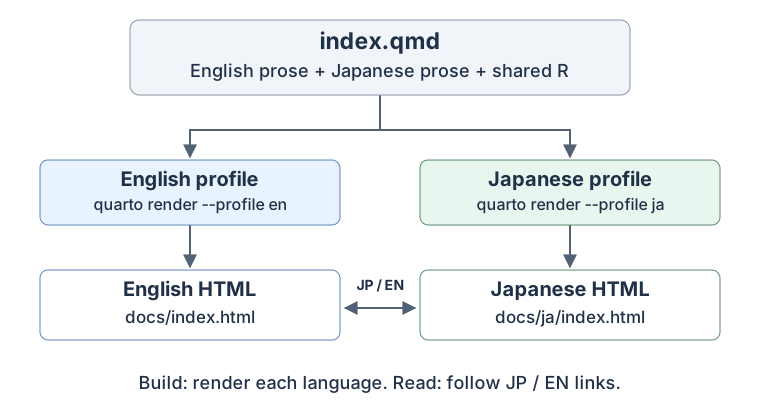
When reading: the browser opens an already built page. It does not run R, render Quarto, or translate the page. Keep both language outputs available.
Try a small project first
The following is a complete minimal example for a new practice folder. It is not a replacement for this repository’s climate-analysis configuration. Install Quarto and, for the shared R example, R with knitr and rmarkdown. This repository already manages its R packages with renv; use its usual renv::restore() workflow instead of adding a second package setup.
Create this layout. docs/ will be generated; do not write translations there.
practice/
  _quarto.yml
  _quarto-en.yml
  _quarto-ja.yml
  index.qmd
  language-switch.html
  filters/
    language-title.lua
  docs/                       # generated / 自動生成
    index.html
    ja/
      index.html
Step 2: Add the two language profiles
lang selects Quarto’s interface language, such as the table-of-contents label. It does not translate your prose. Use separate output directories so the Japanese build does not replace the English HTML.
The navbar links initially point to the home page. Step 5 will make them follow the matching page when more chapters are added.
_quarto-en.yml
lang: en

book:
  navbar:
    right:
      - text: "JP"
        href: ja/index.html
_quarto-ja.yml
lang: ja

project:
  output-dir: docs/ja

book:
  title: "私の日英ノート"
  navbar:
    right:
      - text: "EN"
        href: ../index.html
Step 3: Write both languages in index.qmd
unless-profile="ja" shows English when the Japanese profile is inactive; when-profile="ja" shows Japanese when it is active. :::: opens and closes a language block. Keep these delimiters on their own lines, with blank lines around them.
The executable R chunk is outside both language blocks. Both builds use the same calculation, mean(c(1, 2, 3)), whose result is 2. The #language-switch ID identifies the link used by the navbar script. Only one such link should remain in each rendered page.
index.qmd
---
title: "A small calculation"
title-ja: "小さな計算例"
---

:::: {.content-visible unless-profile="ja"}

[日本語はこちら(JP)](ja/index.html){#language-switch hreflang="ja" lang="ja"}

## Mean of three numbers

We calculate the arithmetic mean of 1, 2 and 3.

::::

:::: {.content-visible when-profile="ja"}

[Read this page in English (EN)](../index.html){#language-switch hreflang="en" lang="en"}

## 3つの数の平均

1、2、3の算術平均を計算します。

::::

```{r}
#| label: shared-mean
mean(c(1, 2, 3))
```Hiding a prose block is not an execution control. Do not put expensive or data-reading R chunks inside the language blocks to prevent them from running. Use chunk options such as eval: false to control execution explicitly. Shared source code may still execute once per language build; sharing the code does not guarantee that the computation runs only once in total.
Step 4: Select the translated page title with a small Lua filter
title-ja is our own metadata field. The filter below replaces title only when lang is ja; it also supports an optional subtitle-ja field. Lua is included with Quarto, so no additional R package is needed for this step.
filters/language-title.lua
function Meta(meta)
  if pandoc.utils.stringify(meta.lang) == "ja" then
    for _, field in ipairs({"title", "subtitle"}) do
      if meta[field .. "-ja"] then
        meta[field] = meta[field .. "-ja"]
      end
    end
  end
  return meta
end
Step 6: Build both languages and check them in a browser
From the practice folder, run these commands in order. The small example has no automatic post-render hook, so both commands are required.
quarto render --profile en
quarto render --profile ja
quarto preview --profile en
Open the local address printed by quarto preview, then test the page link and navbar switch in both directions. Both pages should show the number 2, with their own title and explanatory text. If you edit the Japanese prose afterward, rebuild the Japanese profile before checking it again.
For a chapter under notebooks/, use these relative links. A link is resolved from the generated HTML’s directory, not from the repository home page. Here example is the name of your new chapter, not a page in this site.
| Page being read | Link to the other language |
|---|---|
English home: docs/index.html |
ja/index.html |
Japanese home: docs/ja/index.html |
../index.html |
English chapter: docs/notebooks/example.html |
../ja/notebooks/example.html |
Japanese chapter: docs/ja/notebooks/example.html |
../../notebooks/example.html |
Step 7: Use the existing automation in this repository
This site adds a convenience layer to the minimal example:
_quarto-en.ymlrunsscripts/render-japanese.Rafter the English render.- The script builds Japanese pages when their sources have changed and keeps the English navigation index intact during the second build.
- It also preserves the six old
*_ja.htmlURLs with redirects and writes.nojekyllfor GitHub Pages. These migration steps are specific to this site.
Therefore, in this repository, a normal quarto render builds both languages. An explicit quarto render --profile ja builds Japanese only. Do not put the Japanese post-render hook into _quarto.yml or _quarto-ja.yml: that could trigger repeated rendering. The hook’s paths and list of legacy URLs need adjustment before copying it into a different project.
When adding a chapter here:
- Create a single QMD with both prose blocks, shared code and both titles.
- Add it to the appropriate chapter/appendix list in both profile files.
- Add its filename to the
pageslist intests/check_bilingual.cjs. - Run the build and link check below. Check the actual page switches in a browser.
- Commit the source change and generated
docs/together before publishing.
quarto render
node tests/check_bilingual.cjs
Files to refer to while editing
| File in this repository | Purpose |
|---|---|
_quarto.yml |
Shared book, resources and format settings |
_quarto-en.yml / _quarto-ja.yml |
Language, navigation and output paths |
calculate_ET0.qmd |
A real example of shared calculations and bilingual explanations |
language-title.lua |
Japanese title/subtitle selection |
language-switch.html |
Match the navbar link to the current page |
render-japanese.R |
Automatic second render and legacy URL redirects |
If something does not work
| Symptom | Check |
|---|---|
| Both languages appear in the body | The content-visible attributes, profile name, closing colons and blank lines |
| Japanese prose appears under an English title | title-ja, the Lua filter path and lang: ja |
| JP/EN always returns to the home page | The page-level #language-switch link and loaded navbar script |
| The other language gives a 404 | Both builds exist, relative paths are correct, and both output trees were published |
| The Japanese page is out of date | The Japanese profile was rebuilt after the edit |
| A hidden chunk still reads data | Visibility is separate from execution; explicitly set eval: false |
Editing docs/*.html has no lasting effect |
Edit the QMD/configuration instead, then render |
For GitHub Pages, a successful push is not the same as a successful deployment. Check the deployment for the pushed commit, then open both public language URLs. Publish from a completed, verified build; do not publish a folder while it is being rendered. Climate-data sharing restrictions still apply independently of the language-switching mechanism.
Official references
The underlying Quarto features are Project Profiles and Conditional Content. The title filter, navbar script and automatic second render are this project’s small additions to those features.